
Which iPhone has how much memory
For example, 4 GB: iPhone 12, 12 mini, 13 and 13 mini. 6 GB: iPhone 12 Pro through iPhone 15 Plus. 8 GB or more: iPhone 15 Pro and later, including the iPhone 16 and 17 families and iPhone Air.
Models
SoloLLM includes 16 open-weight models from 0.8B to 12B parameters: Qwen3.5, Gemma 4, Granite 4.2, LFM2.5, MiniCPM5, MiniCPM-V 4.7, Nanbeige4.2, Llama 3.2 and Phi-4 Mini. Which ones run depends on your device's memory, and SoloLLM checks that for you. You can also add your own GGUF model from Hugging Face.
It depends on the model. A 4 GB iPhone runs models up to about 2B parameters, a 6 GB iPhone up to about 4B, and iPhone 15 Pro or later runs Gemma 4 E4B. Qwen3.5 9B and Gemma 4 12B need an iPad with 12 GB of memory or more. SoloLLM marks every model that won't fit.
iOS lets one app use only part of the phone's memory, so SoloLLM checks each model against what your device gives an app, and again against what is free when the model loads. A model that won't fit is marked "Too large", and its page says which devices can run it.
When you first open SoloLLM, it recommends a model for your device: Qwen3.5 2B on 4 GB devices, Qwen3.5 4B on 6 GB devices, and Gemma 4 E4B on devices with 8 GB or more. Of the three, Gemma 4 E4B is the most reliable at calling tools.
Built-in models
Every built-in model downloads from SoloLLM's Models tab. Memory needed is the figure the app shows for each model (its own estimate, with room to work); smallest device follows from it.
| Model | Parameters | Memory needed | Smallest device | Photos | Tools |
|---|---|---|---|---|---|
| Qwen3.5 0.8B | 0.8B | 1000 MB | 4 GB iPhone | Yes | Chat only |
| Qwen3.5 2B | 2B | 1.9 GB | 4 GB iPhone | Yes, 6 GB and up | Yes |
| Qwen3.5 4B | 4B | 3.4 GB | 6 GB iPhone | Yes | Yes |
| Qwen3.5 9B | 9B | 6.8 GB | 12 GB iPad | Yes | Yes |
| Gemma 4 E2B | 2B effective | 3.4 to 5.1 GB | 6 GB iPhone | Google QAT download, 8 GB and up | Yes |
| Gemma 4 E4B | 4B effective | 4.9 to 5.4 GB | 8 GB iPhone | Google QAT download, iPad only | Yes |
| Gemma 4 12B | 12B | 7.4 GB | 12 GB iPad | Yes | Yes |
| Granite 4.2 3B | 3B | 3.0 GB | 6 GB iPhone | No | Yes |
| LFM2.5 2.6B | 2.6B | 2.2 GB | 6 GB iPhone | No | Yes |
| LFM2.5 8B-A1B | 8B (1.5B active) | 5.5 GB | 8 GB iPhone | No | Yes |
| MiniCPM5 1B | 1B | 1.1 GB | 4 GB iPhone | No | Yes |
| MiniCPM5 2B | 2B | 2.1 GB | 6 GB iPhone | No | Yes |
| MiniCPM-V 4.7 1B | 1B | 1.1 GB | 4 GB iPhone | Yes, 6 GB and up | Chat only |
| Nanbeige4.2 3B | 3B | 3.3 GB | 6 GB iPhone | No | Yes |
| Llama 3.2 3B | 3B | 2.7 GB | 6 GB iPhone | No | Chat only |
| Phi-4 Mini | 3.8B | 2.7 GB | 6 GB iPhone | No | Chat only |
For example, 4 GB: iPhone 12, 12 mini, 13 and 13 mini. 6 GB: iPhone 12 Pro through iPhone 15 Plus. 8 GB or more: iPhone 15 Pro and later, including the iPhone 16 and 17 families and iPhone Air.
A model looks at photos with a separate photo add-on. When the model and its add-on don't fit together, the model still loads and SoloLLM reads the text in your photo with on-device OCR instead.
Qwen3.5, MiniCPM5, Granite 4.2, Nanbeige4.2, LFM2.5 2.6B and LFM2.5 8B-A1B can reason before they answer with Thinking on. Each starts with Thinking on or off as its makers set it up. How Thinking works.
Bring your own model
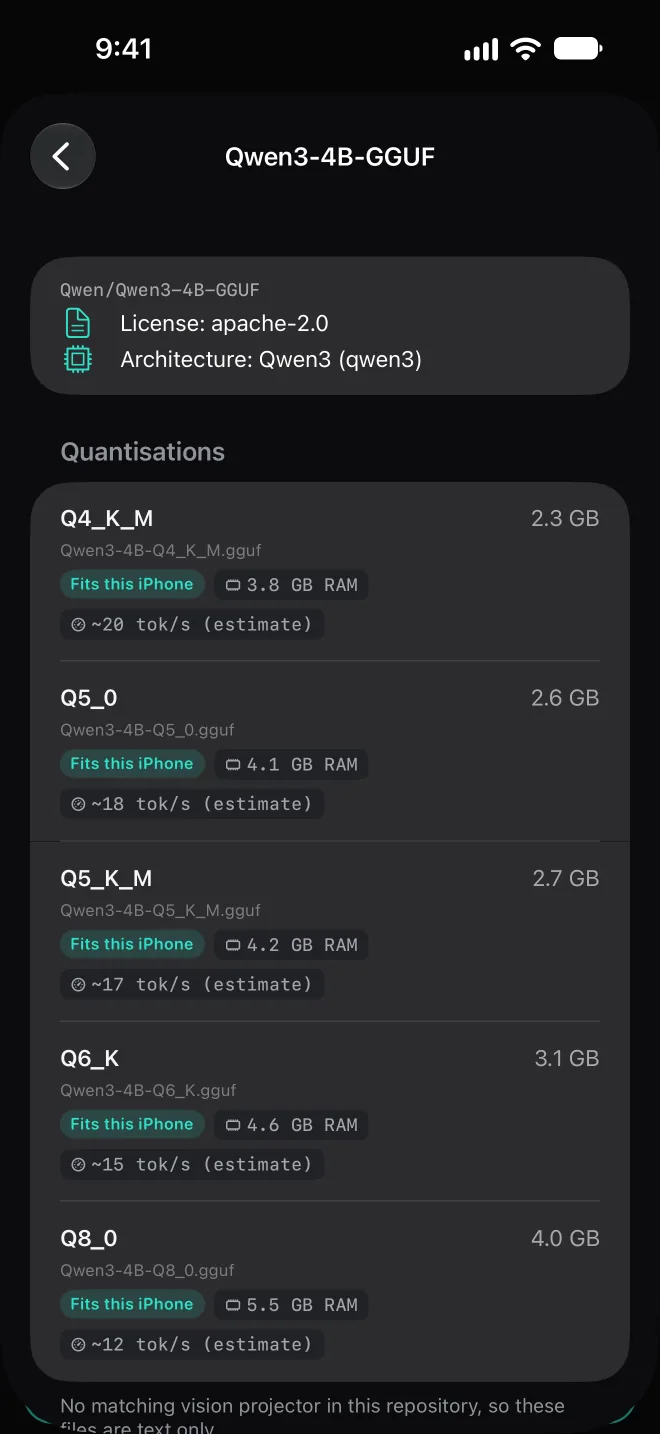
Yes. Search Hugging Face from the Models tab without an account, or import a GGUF file from Files or a link. Before anything downloads, SoloLLM checks the file and tells you whether it fits your device, with a speed estimate. Your models get their own section in the Models tab.
One-time purchase. No subscription. Every built-in model is included.